---
title: "Editor Widget Overview"
slug: "editor-widget-overview"
description: "The Editor widget is ADA-compliant, responsive, and offers advanced tools like expanded font options, full-screen editing, spell check, and more."
updated: 2026-08-05T12:59:52Z
published: 2026-08-05T12:59:52Z
canonical: "www.civicplus.help/editor-widget-overview"
---
> ## Documentation Index
> Fetch the complete documentation index at: https://www.civicplus.help/llms.txt
> Use this file to discover all available pages before exploring further.
# Editor Widget Overview
The [Editor widget](/municipal-websites-central/docs/add-the-editor-widget-to-a-page) has ADA compliance tools and is responsive, including tables. It also includes additional tools and features, such as font options and full-screen mode.
> [!NOTE]
> Important Notes
>
> - Line breaks in the Editor Widget automatically double-space. To get a single line break, press Shift + Enter on your keyboard.
> - The Froala Editor Widget removed the ability to apply underline styling. Only hyperlinks should be underlined. We recommend removing any underline tags (`<u></u>`) from your editor content.
## Font Options
The **Editor** has the option to expand the font options that are available to you. This includes more font types, sizes, and colors available in the drop-down. To turn this feature on, please view our [Enable Font Options article](/municipal-websites-central/docs/enable-font-options-in-the-editor).
---
## Editor Features

-  **Fullscreen:** Expand your editing window to your whole screen
-  **Bold:** Bold text
-  **Italics:** Italicize your text
-  **Strikethrough:** Show your text with a line through it
-  **Subscript:** Allows you to have text smaller than your normal text and on the bottom, similar to subtext
-  **Superscript:** Allows you to make text smaller and align it above the normal text, similar to "x squared"
-  **Font Family:** Choose the font for your text
-  **Font Size:** Change the size of the font
-  **Font Color:** Allows you to edit the color of the text
-  **Background Color:** Modify the background of the text
-  **Paragraph Format:** Select a style made for your site, such as Headline, Subhead1, or Subhead2. Additional [font options](/municipal-websites-central/docs/enable-font-options-in-the-editor) are available
-  **Clear Formatting:** Quickly remove extra formatting on your page. This is helpful if you paste content onto the site and it does not appear correctly
-  **Quote:** Wraps your text in a `<q>` tag, which adds quotation marks and tells screen readers and other devices the content is a quote
-  **Block Quote:** Aligns a block of text differently from the rest of the text
> [!WARNING]
> Note:
>
> This will indent and italicize your chosen text.
-  **Abbreviation:** Informs screen readers that the text is an abbreviation. This helps users better understand the content.
-  **Language:** Tells screen readers that the selected text is in a different language. This improves understanding and translation for users
-  **Spell Check:** Checks spelling and grammar within the editor widget
> [!WARNING]
> **Note**:
>
> Select the number in the bottom right corner to view any errors and receive correction suggestions
-  **Align:** Center, left, right, or justify your text alignment
-  **Increase Indent:** Increase the indentation of text
-  **Decrease Indent:** Decrease the indentation of text
-  **Unordered List:** Add bulleted lists to your content area. You can either select existing text to make a bulleted list, or you can start a new line and begin a new bulleted list.
-  **Ordered List:** Add numbered lists to your content area. You can either select existing text to make a numbered list, or you can start a new line and begin a new numbered list.
-  **Insert Image:** Insert and format images into your content area
-  **Insert Document Link:** Opens up the Document Center so you can select a document to link to
-  **Insert Link:** Add any link to the page
-  **Insert Table:** Insert a table into your content area
-  **Undo:** Undo recent changes
> [!WARNING]
> **Note**:
>
> The undo option will only go back to the most recently saved.
-  **Redo:** Redo recent changes; only recognizes active edits. As soon as the page saves, it will not be available
-  **Special Characters:** Insert special characters onto your page
-  **Select All:** Quickly and easily select all content that is in the editor
-  **Code View:** This option allows you to work on the HTML side of the editor. The code is color-coded to keep track of action items best
-  **ADA Checker**: CivicPlus provides an ADA checker for the content located in the Editor Widget, FAQs, and News Flash. Learn more about this tool in our [ADA Checker](/municipal-websites-central/docs/find-the-accessibility-checker-in-the-editor-widget) article.
- 
**Insert Video:** Insert videos by URL or by embedded code from any source, including YouTube, Vimeo, Yahoo, and DailyMotion.
- 
**Find and Replace**: Search for specific text and change it with something else.
- 
**AI Editing Assistant**: Helps users create, rewrite, and improve website content. If the feature has been disabled for your site, [contact Support](/municipal-websites-central/docs/support) to have it re-enabled.
> [!WARNING]
> **Note**:
>
> The Editor automatically removes inappropriate code from the system to prevent contradictions. If you would like custom coding that the Editor does not allow, please consider the [Custom HTML widget](/municipal-websites-central/docs/add-html-on-a-page).
### Short Cuts
- **Ctrl + Shift + Enter:** Allows you to type directly below a paragraph of text with no space between
- **Ctrl + K:** Shortcut to insert a link
- **Ctrl + V:** Paste
- **Ctrl + C:** Copy
- **Ctrl + X:** Cut
- **Ctrl + Z:** Undo
- **Ctrl + Shift + V:** Plain Paste. Not all browsers will allow this
- **Ctrl + B:** Bold
- **Ctrl + I:** Italics
- **Ctrl + U:** Underline
- **Ctrl + S:** Strikethrough
- **Ctrl + ]:** Increase Indent
- **Ctrl + [:** Decrease Indent
---
## Rich Formatting
The **Editor Widget** recognizes rich formatting that you paste. It displays a pop-up message asking whether you want to [clear the original formatting](/municipal-websites-central/docs/remove-rich-text-formatting) before pasting it into the Editor.
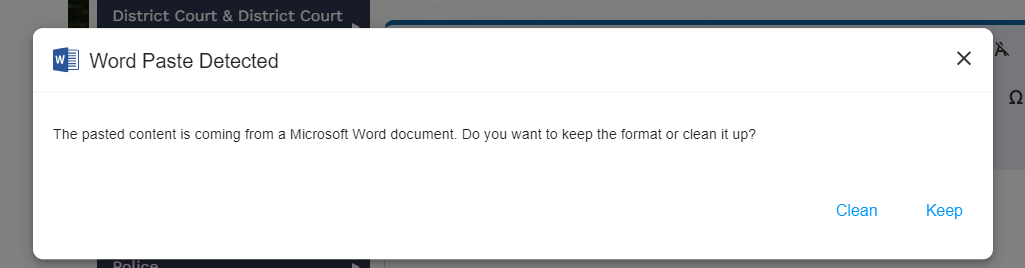
> [!WARNING]
> **Note**:
>
> If pop-ups are disabled, the message will not be seen.
---
## Tags
- Paragraph (P) and heading tags are the correct semantic tags to use in the Editor. They also support SEO and Accessibility.
Americans with Disabilities Act. The Americans with Disabilities Act is a civil rights law that prohibits discrimination based on disability. It guarantees equal opportunity for individuals with disabilities in public accommodations, employment, transportation, state and local government services, and telecommunications.
Hypertext Markup Language. The language used to define the content of the site in a structurally meaningful manner.
Uniform Resource Locator
Artificial Intelligence
Search Engine Optimization.