---
title: "Import Resource Directory"
slug: "import-resource-directory"
description: "Learn how to import items from your computer into the Resource Directory, using .TXT or .CSV formats."
updated: 2025-08-15T15:14:10Z
published: 2025-08-15T15:14:10Z
canonical: "www.civicplus.help/import-resource-directory"
stale: true
---
> ## Documentation Index
> Fetch the complete documentation index at: https://www.civicplus.help/llms.txt
> Use this file to discover all available pages before exploring further.
# Import Resource Directory
This article will show you how to import items from your computer into your **Resource Directory**.
> [!TIP]
> **Who can use this feature?**
>
> System Administrators
## Format Rules
- Depending on your Resource Directory module's configuration, you'll need to either import files in **.TXT** or **.CSV** format. When you click **Upload File** in step 9, the window will prompt you letting you know if your import file format needs to be changed. Attached below are example files in both formats.
- Strings do not need to be surrounded by single (') or double (") quotes
- The following 16 fields are required, and have to be in the specified order:
> [!WARNING]
> **Notes**:
>
> - Empty fields should contain a space
> - The number in parenthesis is the maximum number of characters for that field
> - New Lines are not allowed in any field
> - Blank Lines are not allowed anywhere in the file
1. **Business Name** (255 characters maximum)
2. **Contact Person Name** (100 characters maximum)
3. **Address 1** (255 characters maximum)
4. **Address 2** (255 characters maximum)
5. **City** (30 characters maximum)
6. **State** (3 characters maximum)
7. **Zip Code** (10 characters maximum)
8. **Link to Map** (1 character maximum), options:
- 0 = no
- 1 = yes
9. **Phone Number** (40 characters maximum)
10. **Fax Number** (40 characters maximum)
11. **Email Address** (200 characters maximum)
12. **Show Email As** (200 characters maximum)
13. **Link** (, http:// is **required**) (255 characters maximum)
14. **Link Text** (255 characters maximum)
15. **Open link in new window** (1 character maximum), options:
- 0 = no
- 1 = yes
16. **Description** (1000 characters maximum)
- Any fields past the required 16 are categories with which to associate the business
- A business may be associated with no categories, 1 category, or any number of categories
- Each category must be listed in its own field
## Instructions
[Embedded content](https://www.iorad.com/player/1898113/CivicEngage--How-to-Import-a-Resource-Directory-Tutorial)
1. [Sign in to your website solution](/municipal-websites-central/docs/sign-in-to-your-site)
2. Navigate to the **Modules** menu and on the **Content** tab, click the **Resource Directory** option 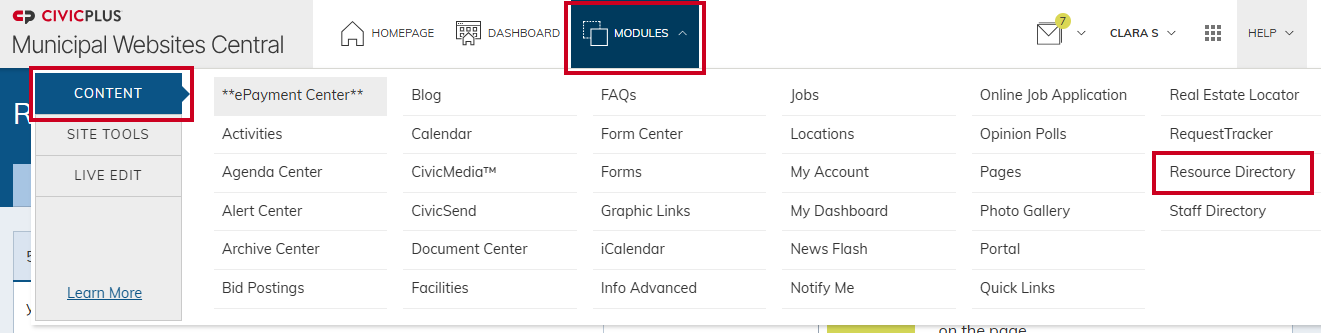
3. Click the **Import Items** tab 
4. In the resulting dialog box, click the **Choose File** button to locate the text file containing the information you wish to import 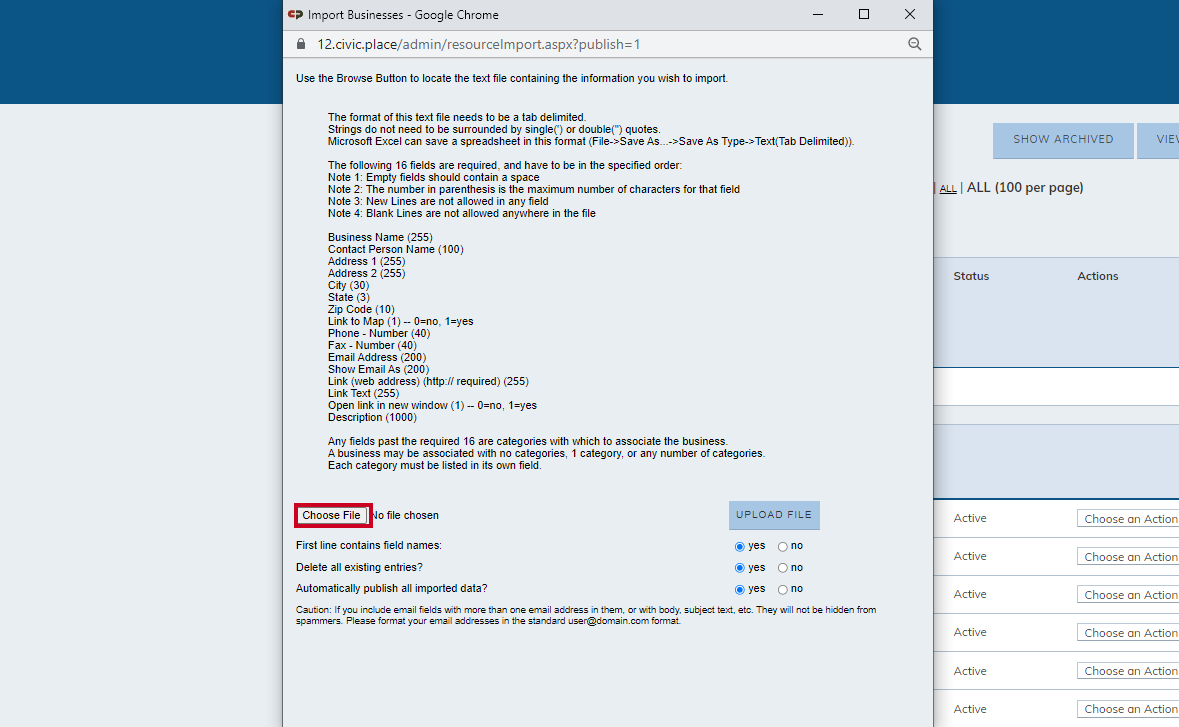
5. Find your file using the File Explorer pop-up window and click the **Open** button 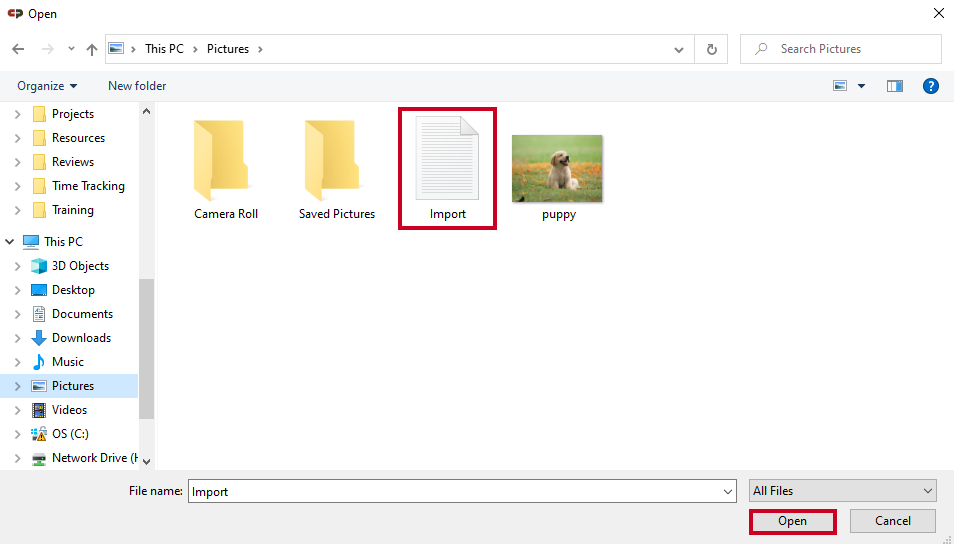
6. Review the provided **Yes/No** questions with care (all options default to 'yes'): 
> [!WARNING]
> **Caution**: If the "Delete All Existing Entries?" option is left as defaulted (with "yes" selected) **all of the existing entries in the Resource Directory will be deleted**.Additionally, if you include email fields with more than one email address in them, or with body, subject text, or other HTML code, they will not be hidden from spammers. Please format your email addresses in the standard user@domain.com format.
7. Click the **Upload File** button 
8. Click **OK** on the pop-up that says **All records were imported successfully** 
> [!WARNING]
> **Note**: The pop-up may display a note that says **Duplicate data was found and not imported** if any of the information you are attempting to import is a duplicate entry.
## Resources
Hypertext Markup Language. The language used to define the content of the site in a structurally meaningful manner.