---
title: "General Ledger (GL) Code Import"
slug: "general-ledger-gl-code-import"
description: "Learn how to complete and submit the General Ledger (GL) Code Import Template for CivicRec implementation, including required fields and account types."
updated: 2025-08-13T15:45:02Z
published: 2025-08-13T15:45:02Z
canonical: "www.civicplus.help/general-ledger-gl-code-import"
stale: true
---
> ## Documentation Index
> Fetch the complete documentation index at: https://www.civicplus.help/llms.txt
> Use this file to discover all available pages before exploring further.
# General Ledger (GL) Code Import
The General Ledger Code Import comes complimentary with every Recreation Management Implementation. This article outlines the process and requirements for submitting the GL Code Import Template.
## Instructions
1. Download the [GL Code Import Template](https://civicplushelp.zendesk.com/hc/article_attachments/360097957093/GL_Code_Import_Template.xlsx) to your desktop.
2. Complete the following columns:
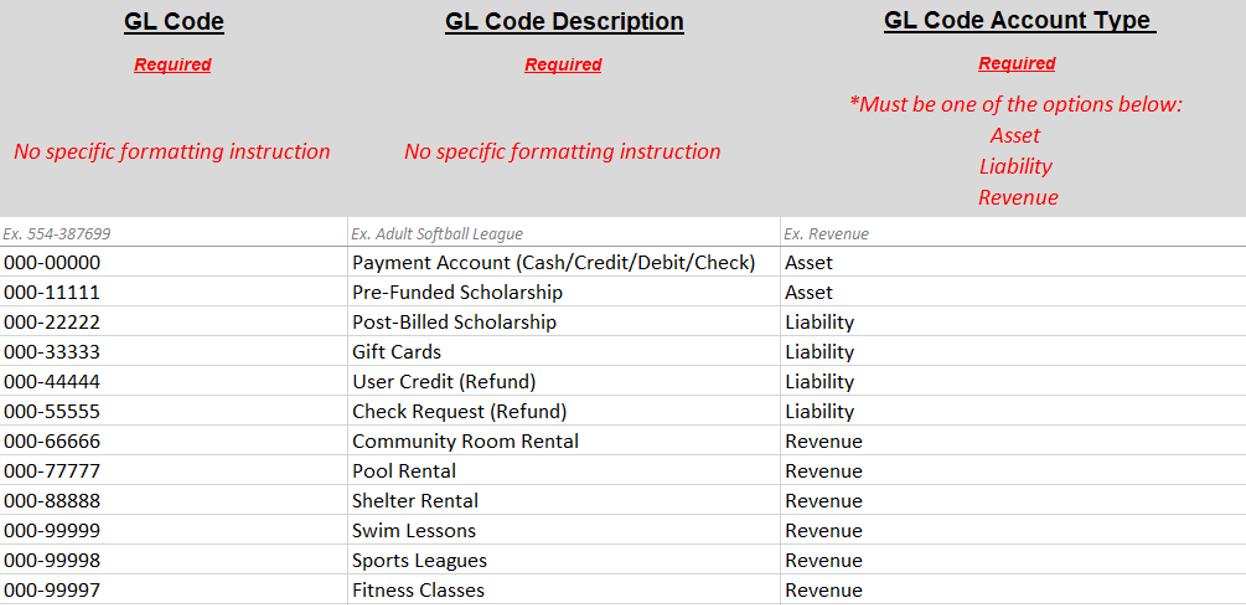
- **Column A - GL Code:** Required field with no formatting requirements (100 characters or less)
- **Column B - GL Code Description:** Required field that accepts only alpha and numeric characters (100 characters or less)
- **Column C - GL Code Account Type:** Required field and must be one of the following
- Asset
- Liability
- Revenue
3. Save the completed template and submit it to your Implementation Consultant/Project Manager on Mavenlink.
## Tips
- Must have (at least) one Asset Account for Payments and any Pre-Funded Scholarships.
- When customers pay, their money passes through the Payment Account and is directed to the appropriate Revenue Account.
- If you do not have a pre-determined Asset Account, one will be created during your Configuration Training.
- Must have (at least) one Liability Account for each Refund Type, any Post-Billed Scholarships, and/or if you plan on issuing Gift Cards.
- When a customer is refunded, the money is taken out of the appropriate Revenue Account and passes through the appropriate Refund Account (Liability) and back to the customer, with the exception of Credit/Debit Card refunds).
- If you do not have pre-determined Liability Accounts, each Refund Type Liability Account will be created during your Configuration Training.
- Must have [at least] one Revenue Account to direct payments and for reporting purposes. This could include a catch-all if you are a small operation or hundreds if you’re a larger operation.
> [!WARNING]
> Note:
>
> Recreation Management does not support Fund Accounting
## Template Example
## Finished Import Example
To view GL imports in Recreation Management, Navigate to the **Configuration** tab, and then select **Financial Settings,** and then **General Ledger,** Then click the Chart of Accounts button

## Resources
- [Project Deliverables](/recreation-management/docs/civicrec-customer-work-project-deliverables)
General Ledger.